
Release Notes: September 10, 2026
What’s New
Data Integrity Alerts
Data Integrity Alerts help researchers protect the quality of their data by automatically detecting and flagging participant-uploaded images or videos that show signs of being AI-generated or edited, making it easier to identify submissions that warrant further review.
- Flexible Configuration: Enable AI Media Detection at the study level, and turn it off for individual tasks where the check isn’t required.
- Targeted In-App and Email Alerts: Choose which study team members are notified when a potential issue is detected.
- Researchers Stay in Control: Alerts are indicators for review, not verdicts. Recollective surfaces the signal and leaves the decision to accept, reject, or delete a response with your team.

External Content Activity
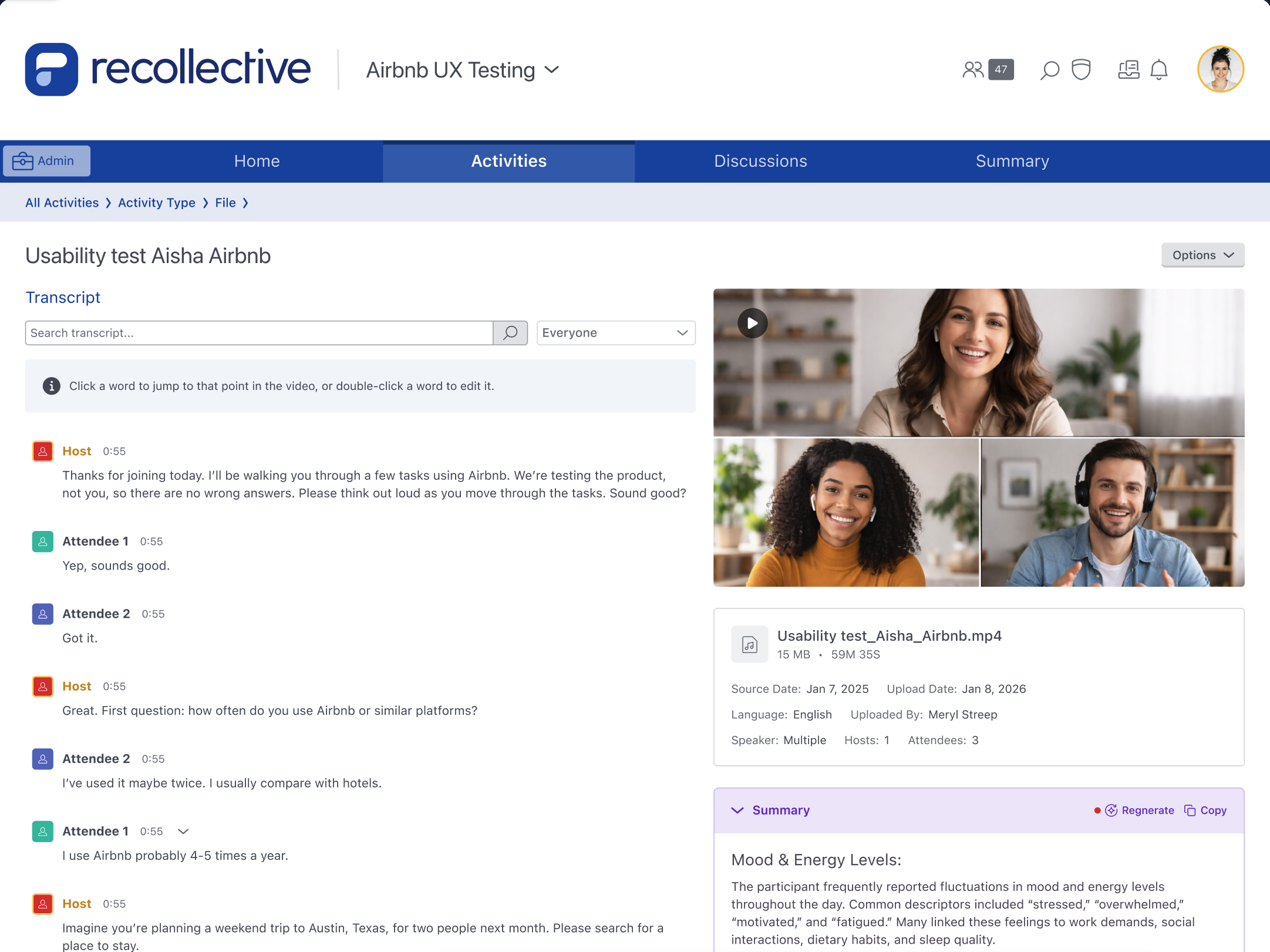
External Content Activity allows researchers to bring interviews, focus groups, and other recordings captured outside Recollective into a study for transcription and AI-powered analysis. Upload recording files into the platform, so external research can be attributed, excerpted, and analyzed alongside the rest of your study data.
- Bulk Upload and File Management: Drag and drop multiple video or audio recordings into an activity accessible only to admins. Then search, sort, and navigate between files as the library grows.
- Automatic Transcription and Translation: Recordings are transcribed in the language spoken, with hosts and attendees identified automatically and transcripts available in any of your Study Languages.
- Participant-Level Insights Across Sources: Analysts and Moderators can link any attendee in a transcript to an active participant, so their external contributions are analyzed alongside their in-platform activity.
- Familiar Analysis Tools: External Content works with AI Summaries, Ask AI, and Word Clouds to accelerate time to insights. Standout moments can be saved as coded excerpts or video clips ready to drop into a highlight reel or report.
Moderator Privacy Controls
Organizations can now control how much participant information Study Moderators can access. These controls give teams the flexibility to meet privacy policies, contractual obligations, and least-privilege requirements without changing the way Moderators already work.
- Flexible Moderator Restrictions: Analysts can restrict Moderator access to specific participant information, including directories, profile pages, profile photos, email addresses, and profile fields.
- Consistent Privacy Across the Study: Once restrictions are enabled, they apply wherever participant information appears, including profiles, directories, reports, transcripts, exports, messaging, and filtering tools.
- Site-Level Defaults: Analysts can establish default Moderator privacy restrictions for newly created studies, helping organizations apply consistent privacy standards without recreating settings for every study.

Key Improvements
A Redesigned Transcript Experience for Live Meetings
We’ve redesigned the transcript experience for Live Video Interviews and Live Group Chats to make reviewing and analyzing conversations easier, more consistent, and more accessible. The new layout gives each meeting its own dedicated review space, bringing video, AI summaries, and transcripts together without changing any of the transcript functionality researchers already use.
AI Model Upgrade for Translations
We’ve upgraded the AI powering translations and media summaries across the platform to deliver more natural, accurate, and consistent results in the experiences customers already rely on.