
Release Notes: March 13, 2026
Key Improvements
Conversation Task
We’ve introduced Summary Guidelines to Conversation Task to bring greater structure, consistency, and flexibility to AI-generated participant summaries.
- Objective-Aligned Summaries: Summary guidelines are automatically generated from your Conversation Objective, ensuring outputs are aligned with your research goals from the start. Admins can further refine or customize guidelines to meet reporting or stakeholder needs.
- Real-Time Editing and Preview: View and update Summary Guidelines alongside generated summaries in a single modal, with instant refresh to validate structure before launch.
- Summary Regeneration: Update guidelines before or after collecting responses and regenerate individual participant summaries to reflect the revised structure, without re-running conversations.

These improvements make summaries easier to compare, more aligned to research intent, and more reliable for qualitative analysis.
Ask AI: Task Comment Analysis
We’ve expanded Ask AI to deliver even more complete and context-rich insights by incorporating Task Comments into analysis, ensuring insights reflect the full conversation, not just the original task response.
- More Complete Insight Coverage: All qualitative study content, including comments tied to task responses, is now incorporated into AI outputs for a more holistic view of participant feedback.
- Context Preserved in Results: Comments remain linked to their associated task responses, maintaining clarity and context within AI-generated answers and verbatims.General Improvements
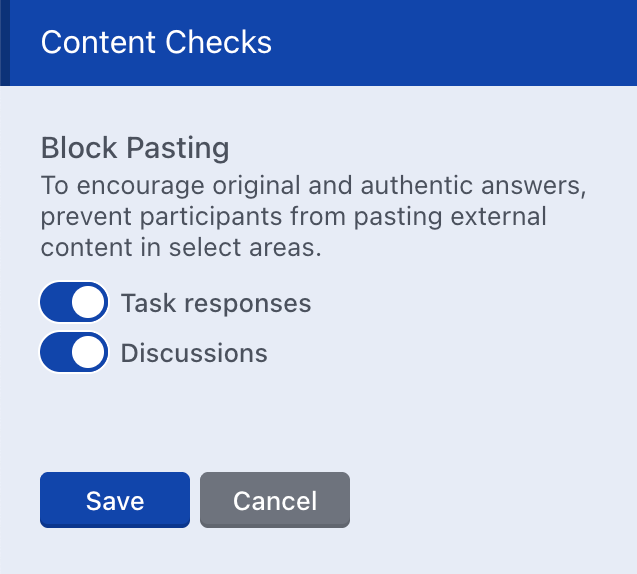
Content Checks: Block Pasting for Discussions
We’ve expanded our block pasting capabilities to Discussion Topics, Replies, and Comments, aligning with protections already in place for task responses to help ensure authentic participant contributions.
- Flexible Study-Level Controls: Admins can enable or disable paste blocking at the study level via Study Settings.
- Topic-Level Overrides: Individual discussion topics can override the study default during setup, while participant-created topics follow the study-level setting automatically.
Activity Preview Improvements
We’ve clarified preview options to make testing Visibility Logic more intuitive and reduce confusion during activity setup.
- Clearer Preview Modes: The primary Preview button now offers two clearly labeled options:
- Preview Mode (respects task visibility logic)
- All Tasks (shows all tasks regardless of logic)

Both options are given equal visual weight to help admins confidently validate activity configuration.